


Updating Massive Backend Records System
Reconfiguring little resourced, but massively helpful Salesforce records system updating tools as part of larger product maintenance and overhaul.
My Contribution
Lead Designer
Userflows, Wireframes, Mockups, Prototype, Hi-fi Handoff, QA Regression, Shipping, Design System
Lead Researcher
Product maintenance, interviews, SME testing
Company
Business Model
Litify, Inc.
SaaS
B2B
Legal Technology
Enterprise Software
Team
Tools
Product Manager
Design Manager
Engineer Manager
QA
Figma
Figjam
Loom
Chorus.ai (Zoominfo)
Jira
Confluence
Notion
Year
2022 – 2023
Background
Within individual Salesforce organizations, law firms contain many different user roles. At any time for any reason, these roles on any given working case - or Matter - may change. These changes require updates to their records system, frequently extending less than 100 instances, but to 10k at maximum support.
This records system is vital to providing the sensitive case information securely and correctly to the appropriate firm members.
Problem
Because users frequently exit Matters, there must be a way to update task assignment on a grand scale and with complete confidence.
Right now, users experience a complete lack of design feedback. To update records, the unclear progression and hidden tools is confusing. This results in only the power user updating records.
In the long run, this is ultimately disruptive and an unsustainable process.
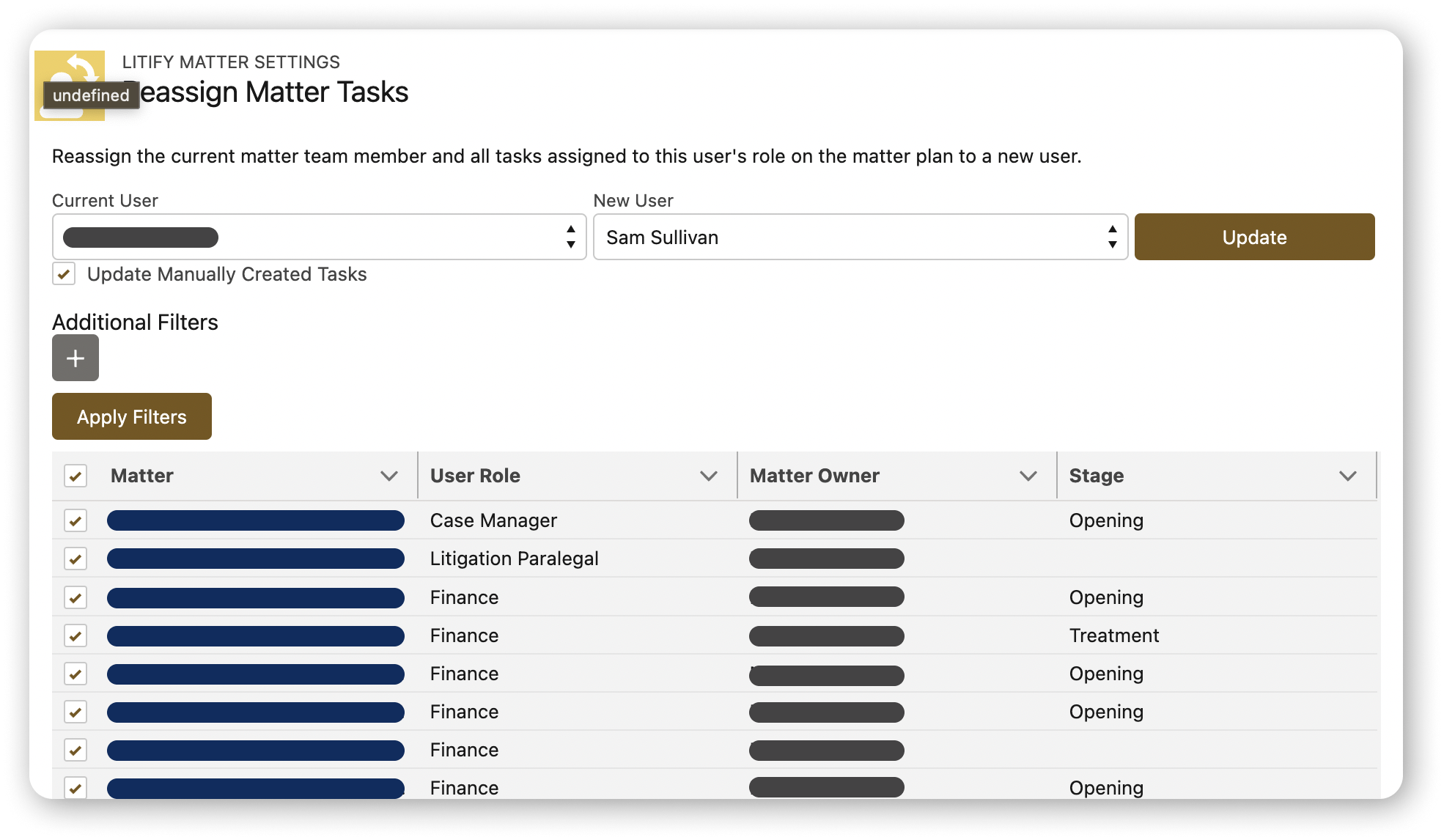
The current bulk records updating tool

Solution
Replace the current records bulk updating system with a new, custom component to handle users’ needs.
In the new component, create new workflow:
Consolidate actions
Present a clear & limited process
Redo how datatable filters work
Build trust with managing high amounts of sensitive records
Users
The only present user is the power user: the system administrator.
The new component will include a more intuitive journey for additional users to accomplish tasks.
Introducing the Bulk Updates component

Challenges
Limited research and build time
We struggled to understand the system and how to fix.
We knew current system was deeply inadequate, but were assigned without more knowledge of the clear problems.
Approach
Understanding the scope of an incredibly technical feature, I set out to map it:
Workflow
Input data variables (objects, fields, individual operators, assumed values)
Organization data relevant to our requirements
How communicated feedback
Because I had no access to additional research - such as previous product research or interviewing users - I found time to discuss the feature and comb for insights from subject matter experts, the design director, and colleagues working in Customer Solutions. This really helped me to understand quickly enough that we had a problem.
I continued to work, rapidly-iterating designs and flows. None seemed to be the solution, despite requirements being met. Thankfully, due to my diligent work collecting all the technical information on the feature and the extraneous information surrounding it, the problem was found: the requirements were set with a poor understanding of feature.
The concept was simple enough, but due to poor product knowledge, understanding where the target actually lied with what we could technically solve (especially within the timeframe with present resources), new requirements were written and the scope reset.
Problem in Plain View
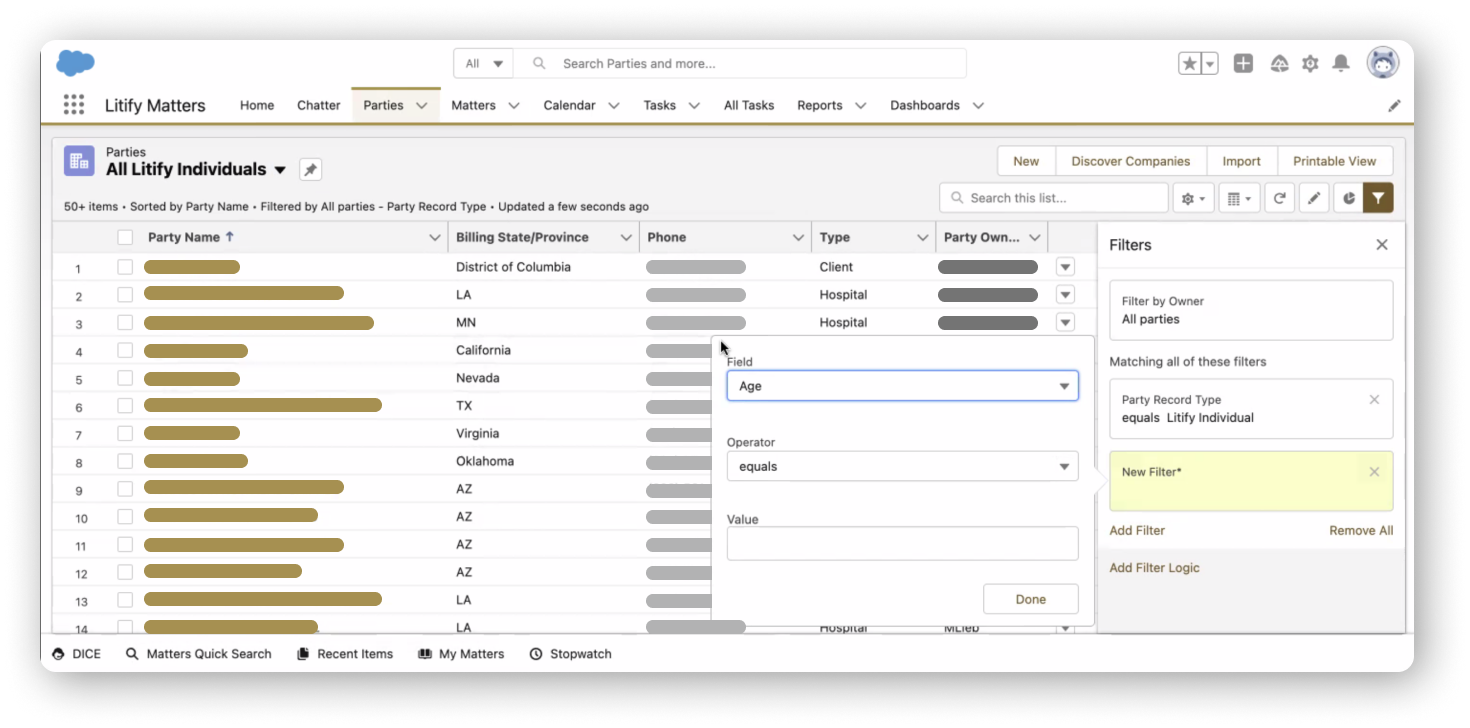
Here (image) we can see already the overlaying filters competing with different sets of data.
Our needs were ignoring the way the data was stored, accessed, and connected.
Resolution
With the feature now being thoroughly understood and mapped, and with the project’s targets being more clear, it did not take long to design usable screens and flows for the larger team to disseminate progress and move forward.
Highlight 1
New Custom Component
Hit fullscreen and explore the primary prototype. There are 11 screen flows under 4 categories organized into 3 sections.
Out with the Old Tool
Previously, the access point for updating systems records were buried on the backend through various layers. It was a painpoint for the common user to remember how to find when they infrequently needed to use the tool. Lack of use eroded the product knowledge that when met with the confusing setup, ultimately eroded usage. Many law firms became reliant on – even going as far as assigning – systems administrators to operate this integral tool.
In with the New, Custom Component
Designed to function as a component, the new updating tool has been brought forward to the users; it no longer is buried within the deeper settings. System administrators now can place the component in any location within their law firm’s organization.
From a 90%+ single user rate, it now is used 23% of the time by that user (system administrators), signaling high adoption of new users across law firms.
Highlight 2
Taming the Datatable Logic
The most friction with this project came in the form of the team not understanding how the technology worked. The way Salesforce applied datatable logic was unique, so it took time to understand.
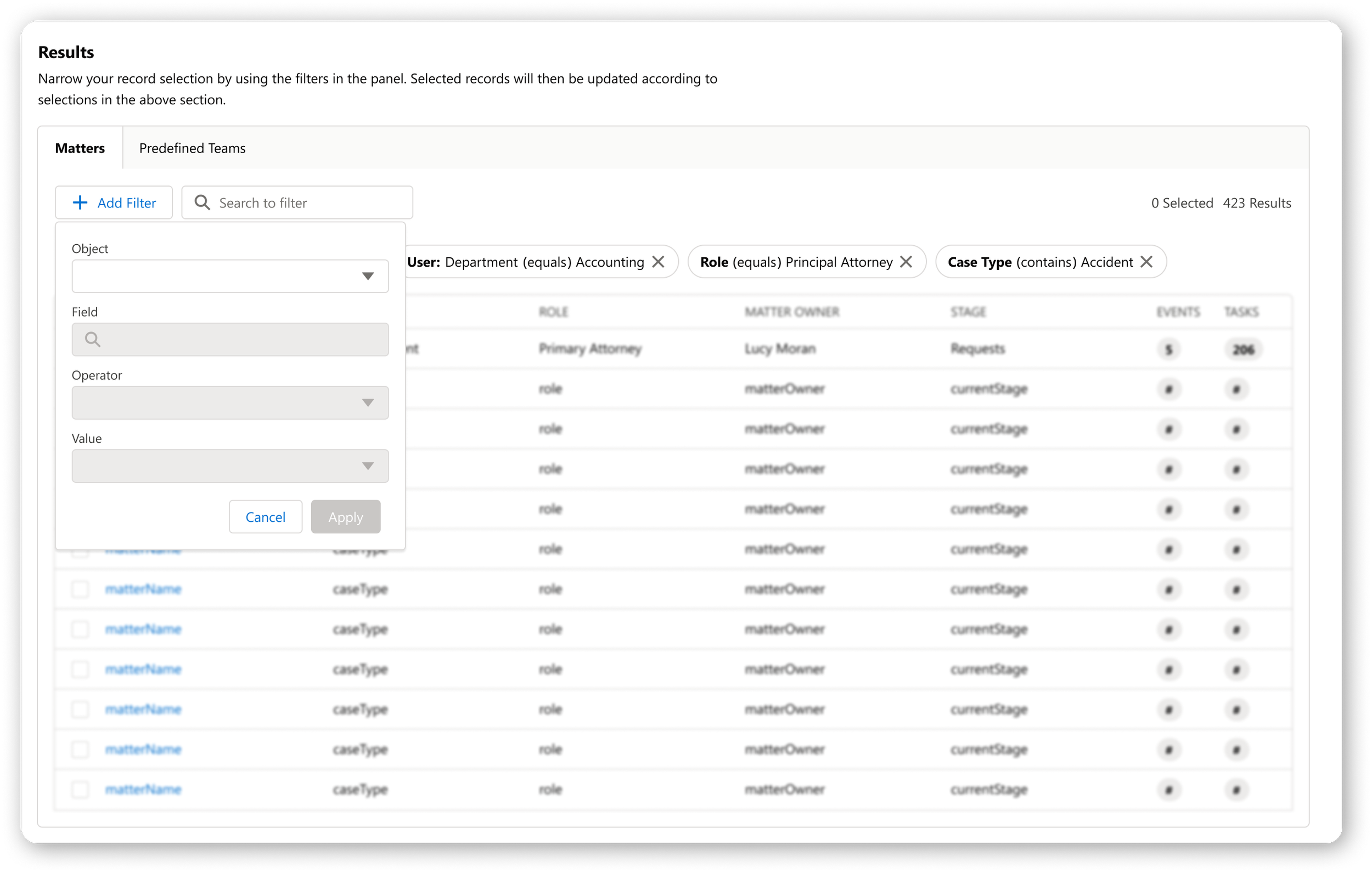
With it understood and with our needs clearly defined in the new context, the new component was designed to bring visual elements from simple datatables that common users would recognize, as well as introduce new patterns to better provide all the design feedback previously missing.
Current Filters Visual Design
New Filters Visual Design
Design Contributions
I created a Figma component for the filters and pill that allow us to quickly build out designs. These are some of my contributions to the Litify Design System and can be seen in many products and features to date.
Highlight 3
Validating Trust
Not only was the current tool hard to locate, difficult to understand, and its tools imprecise, the tool was handling massive dataloads (up to 10,000 documents) of very sensitive information. Any mistakes or misplaced documents can result in serious or criminal real life consequences.
*Key to note is that this new tool is part of the Core Product, where hypercustomization of everything from settings to progression is dominant. While the steps of the user are clear and connected, it is designed for non-sequential usage.
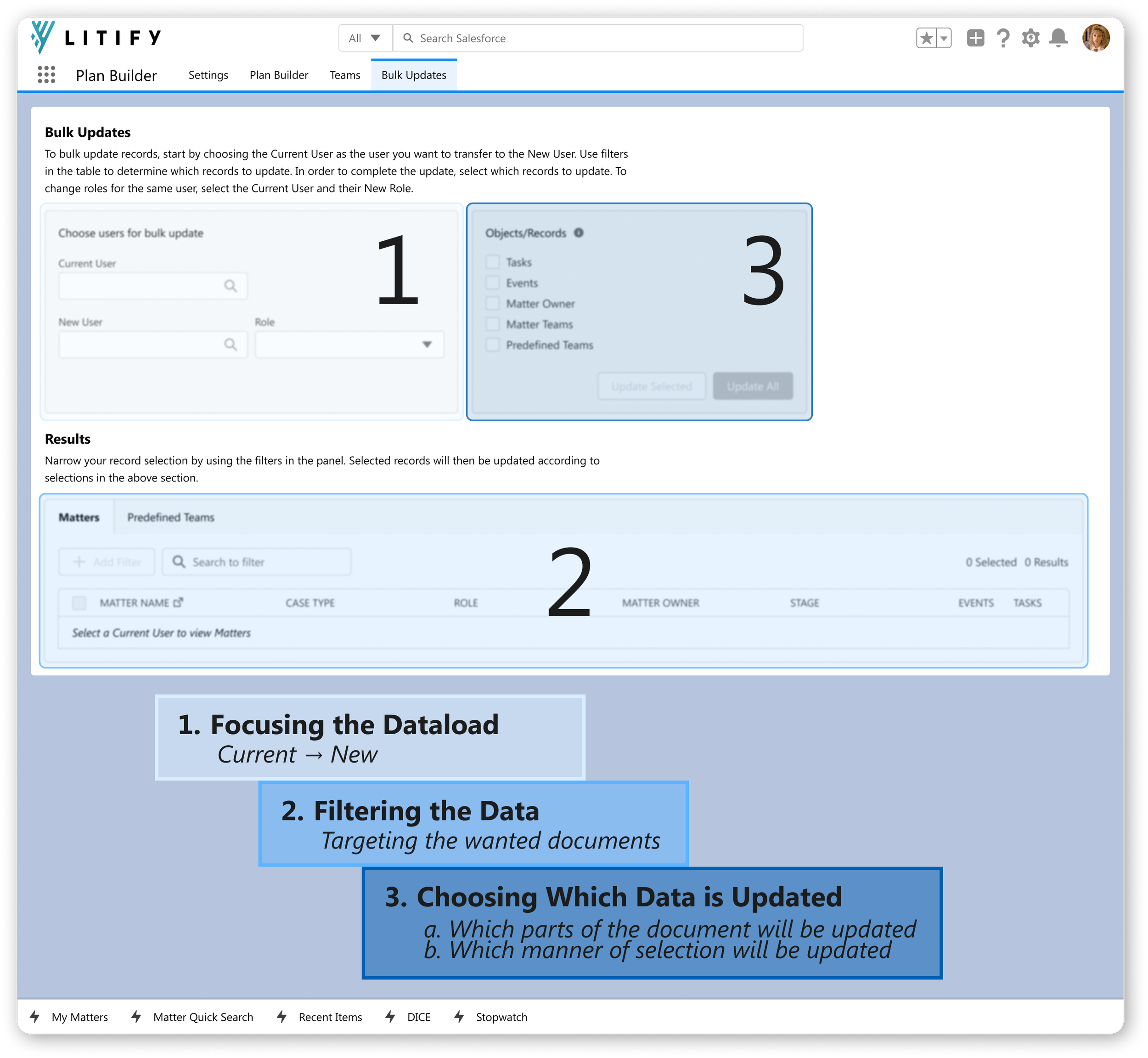
1. Secure the path
Clearly show the steps to user.
2. Build Confidence
Inform the users directly on how to perform actions without doubt.
Current UX Writing
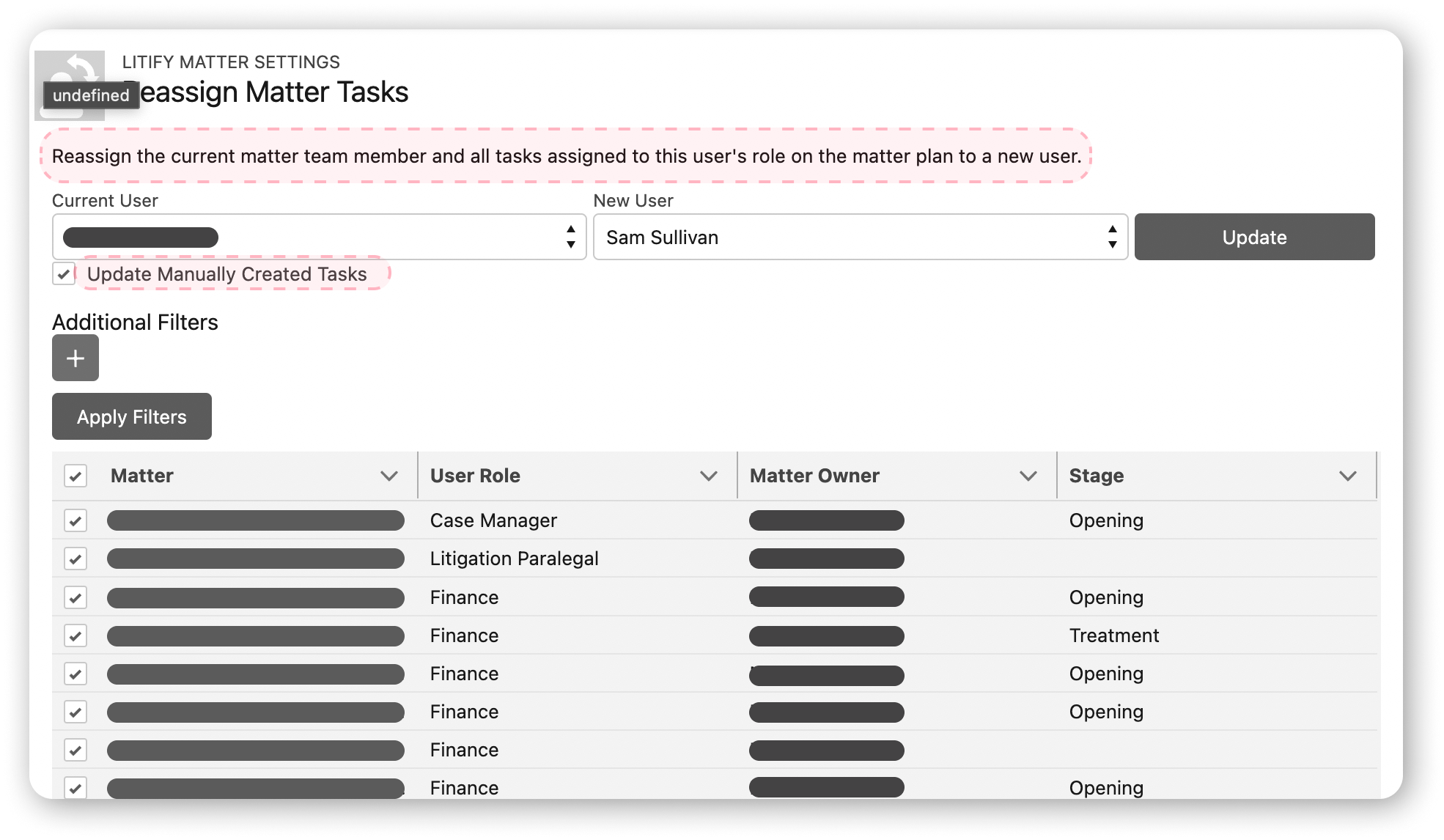
Current copy is ineffective because it is indirect, relies on existing experience or knowledge, and lacks visual awareness.
3. Create Trust
Provide higher touch to users and bookends to provide assurance in their execution. Users are now empowered in this task.
a. Dynamic Datatable
Active filters displayed clearly with the applied properties
Results can be filtered through text
Text indicators informing the data being interacted with (“50 selected”) and where within the set they are selecting and viewing (“62 Results”)
b. Flow Bookends
States are built-in to safeguard users.
Cannot populate table without a Current user
Cannot update without a New User or (new) Role selected
Cannot update without selecting which Objects or Records
Even if selections are made within datatable
c. Concrete Feedback
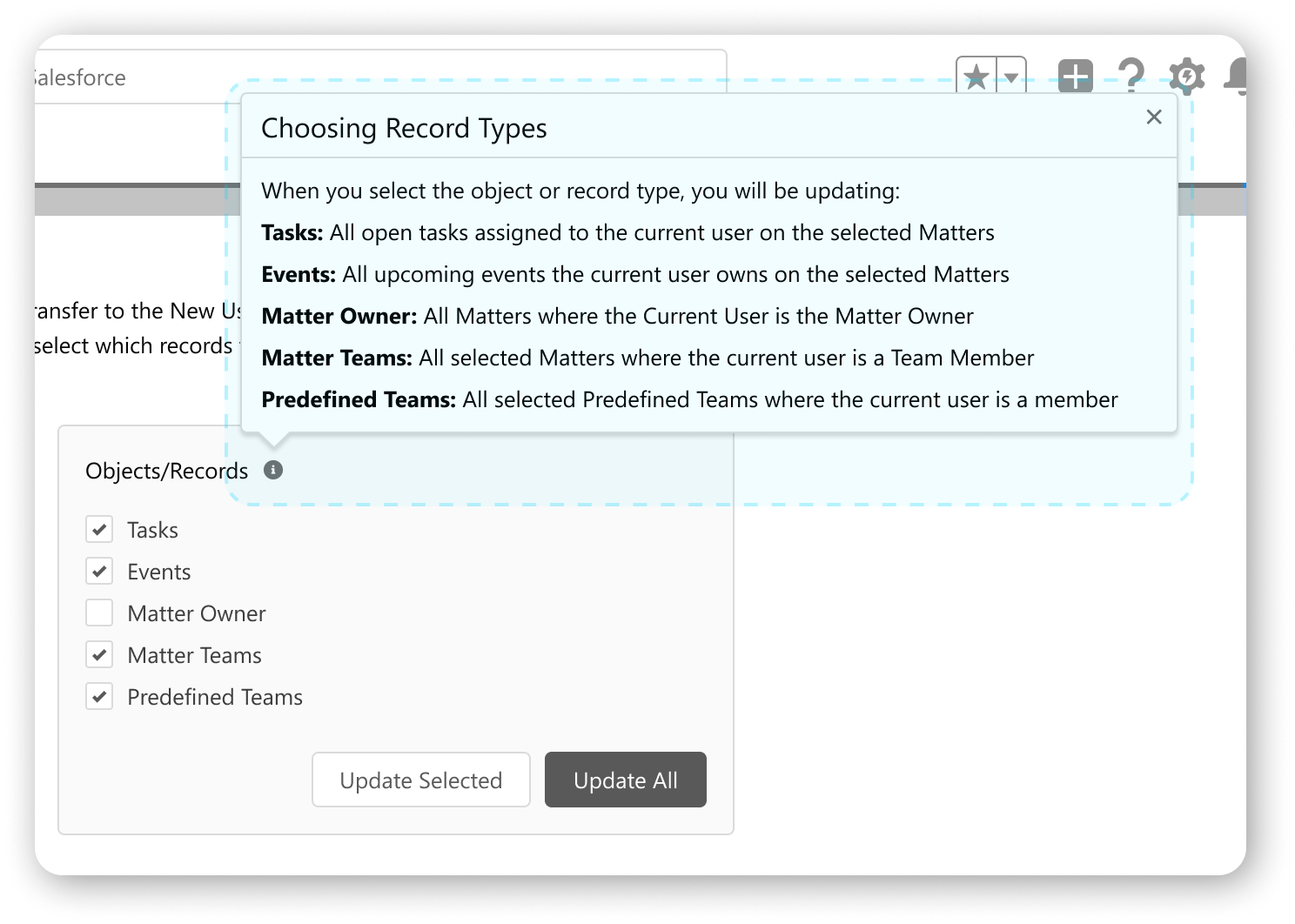
The complex process is made as clear as possible to the user with consistent passive (tooltip) and active (receipt) step confirmations.
Improved UX Writing
New copy is better because it is direct, informs users without expectation of prior experience or knowledge, is sequential, includes visual awareness, and highlights key values.
Delivery & Feedback
Project shipped end of October 2022, and it was incorporated into Q1 release of 2023.
Finished project received overwhelming praise from stakeholders for doing “exactly what [we] wanted” to do “and more.”
Additional praise was given for confirmation receipt and background processing with notification.
Legacy
The unexpected success of this niche feature in our Core product had great reception internally:
stakeholders gained additional confidence in Product’s push for greater maintenance and refreshing the branding
this execution and resourcing inspired inserting backlog of needed product maintenance into the 2023 roadmap
Within Figma, the Litify Design System was updated with the new components for Filtering.
Project Summary
My diligent work and close collaboration with the subject matter experts, product owner, and technical manual helped salvage this project when its unknown complexities knocked it off the tracks. The diligence kept it in focus through a reset and on course to deliver with a branded refresh and lean materials to make it to our annual, big release.